Sign and stamp PDF documents in seconds.
Create your company stamps once. Sign PDF places them in the free space of every page — never over your text — and adds your handwritten signature.
Everything you need for signed documents
Built for people who stamp and sign many PDFs every day — and want it done right the first time.
Stamps made in the app
Round, square, rectangular, oval, dater or a signature stamp — with your texts, fonts and ink colour. No scanning, no image editing.
Automatic placement
Sign PDF finds the free space at the bottom of every page and fits the stamp there, shrinking it only as much as needed — never over text or tables.
Your handwritten signature
Load a photo of your signature: the paper background is removed and the signature lands on the signature line, in black or ink colour.
Up to 4 stamps per page
Company stamp, approval stamp, date and signature together — each one with its own date, placed side by side without overlapping.
Adjust like in Word
Drag a stamp, resize it from the corner or rotate it with the handle. Double-click to edit it. Every page can be tuned by hand.
Fast with large files
Opens long PDFs instantly and signs dozens of documents in one click. Everything runs locally — your files never leave your computer.
It finds the empty space for you
Sign PDF reads every page, detects text, tables and existing stamps, and puts your stamp where there is room — bottom right, centre or left, as you prefer.
- Never covers text, tables or other stamps
- Shrinks the stamp only when space is tight
- All pages, first, last or a custom range

Your real signature, on the line
Take a photo of your signature on paper. Sign PDF removes the background and fits it on the signature line of your stamp — exactly like signing by hand.
- Background removal with adjustable sensitivity
- Original colours, black & white or ink blue
- Move, scale and rotate with the mouse
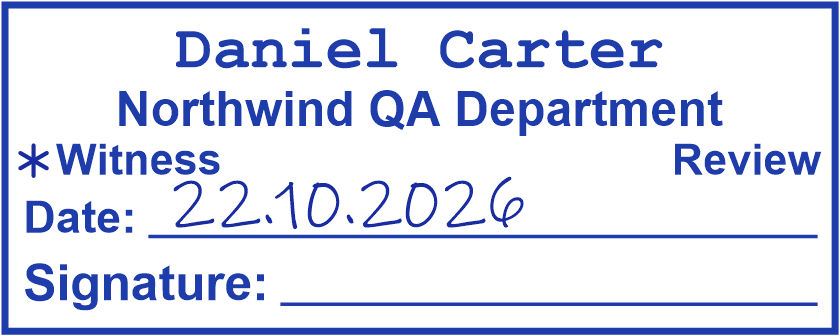
A stamp for every document
Every style is fully editable: texts, fonts, sizes, colours, borders and line weights.

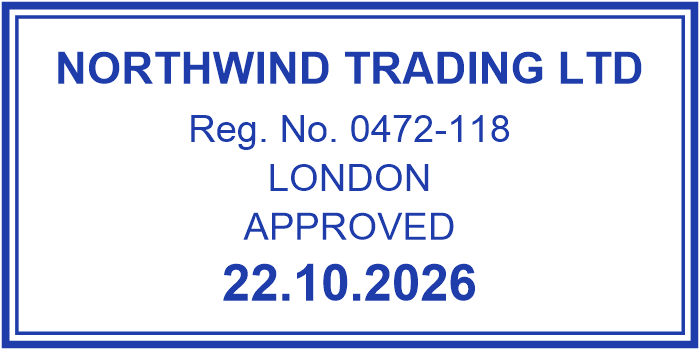


From document to signed PDF in three steps
Add your PDFs
Drag them into the window or open them straight from Windows with “Open with → Sign PDF”.
Tick your stamps
Sign PDF places them on every page automatically. Adjust any of them by hand if you like.
Save
Get your signed PDFs, ready to send, in the folder you choose — one document or all of them at once.
Simple monthly plans
No contracts. Upgrade, downgrade or cancel at any time.
Essential
For one person who stamps documents now and then.
- 1 stamp on documents at a time
- Round, square, oval, dater and more
- Unlimited documents
- 1 computer
Professional
For daily work with several stamps and your signature.
- Up to 4 stamps at a time
- Every stamp style
- Personal signature stamp
- 2 computers
Business
For offices and teams sharing one account.
- Everything in Professional
- Up to 5 computers
- Made for offices and teams
- Priority support
Prices in US dollars. Payments are processed securely by Stripe.
Questions, answered
Which systems does Sign PDF run on?
Windows 10 (version 1809 or later) and Windows 11, both 32- and 64-bit. Nothing else needs to be installed.
Do my documents get uploaded anywhere?
No. PDFs are opened, stamped and saved only on your computer. The internet is used just to check your account and subscription.
How do I pay and get an invoice?
Choose a plan inside the app and pay by card, Apple Pay or Google Pay. Payments are processed by Stripe (sold through Link); your receipt and invoice arrive by email automatically.
Can I change or cancel my plan?
Yes, any time: File → My account → Manage subscription. If you cancel, your plan stays active until the end of the period you paid for.
Does it work offline?
Yes — for up to 7 days after the last subscription check.
Can I use my own handwritten signature?
Yes. Load a photo or scan of your signature; Sign PDF removes the paper background and places the signature on the signature line. You can move, scale and rotate it.
Something else? Contact us or write to support@getsignpdf.com.
Stamp your next PDF in seconds.
Create your stamps once — Sign PDF places them on every page for you.